Radar · LVDS · Ethernet · Hardware Debugging

DCA1000EVM Raw ADC Debugging

Raw ADC capture fault isolation across IWR6843 and DCA1000EVM: control UDP, LVDS data, firmware, and power paths.

Control UDP observed · raw ADC 0 packets
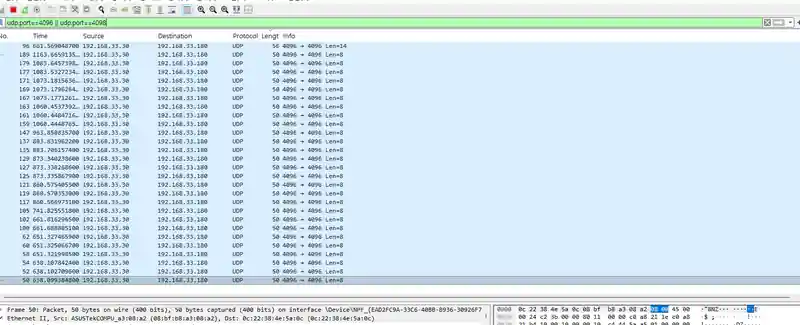
Wireshark filtered to short UDP control datagrams from 192.168.33.30 to port 4096 on 192.168.33.180

Open the files

01

Problem

Isolate the cause of missing raw ADC data while control packets are visible.

02

Architecture

IWR6843 ADC → LVDS → DCA1000 FPGA/DDR3L → Ethernet → PC, with separate UART/UDP control paths.

03

Hardware and Software

  • IWR6843ISK
  • DCA1000EVM
  • Wireshark
  • UniFlash
  • Tera Term
  • mmWave Studio

04

Data Flow

Distinguish configuration/control UDP from raw ADC payload using ports, packet lengths, and capture logs.

05

Methodology

  • Filtered IP/UDP ports to separate background traffic and control packets
  • Compared UniFlash status and UART responses
  • Recorded Studio errors, zero-packet logs, and hardware heating

06

Results

  • Control UDP packets observed
  • Raw ADC receive count: 0 packets
  • 36 distinct diagnostic screens with checks organized by path

What I worked on

  • Separated control and data paths and filtered packets by port
  • Traced firmware, serial-port, and runtime errors
  • Organized checks around thermal, power, and connectivity observations

Code and results

  • Wireshark control-UDP records
  • UniFlash, Tera Term, and mmWave Studio diagnostic screens
  • Raw capture log: received packets = 0

Design scope and next steps

Observed: control-UDP exchange and firmware programming; zero raw ADC packets. Status: capture fault. Follow-up checks: LVDS settings, power, and hardware.

Control UDP was visible; the raw ADC capture log reported 0 received packets. The record separates connectivity, configuration, firmware, and data paths to isolate the fault.

Publication first-page preview